Skip to Content
Softagram
  • Home
  • Services
    • ERP
    • AI Services
    • Security
  • Company
  • Contact
  • Blog
    • News
    • Guides
  • Tech
  • Sign in
  • Contact Us
Softagram
      • Home
      • Services
        • ERP
        • AI Services
        • Security
      • Company
      • Contact
      • Blog
        • News
        • Guides
      • Tech
    • Sign in
    • Contact Us

    How to add team members

    Tutorials
  • All Blogs
  • Oppaat
  • How to add team members
  • August 15, 2019 by
    How to add team members
    Matti Mäki

    Once you have upgraded to a team license (or when using Softagram Enterprise), you can add an unlimited amount of team members with access to Softagram. Here are the required steps.
    ​
    1. Login to Softagram web, e.g. https://private.softagram.com
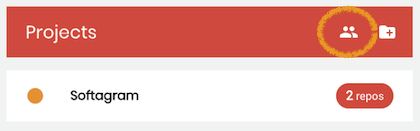
    2. On top of your projects list, click the User Management icon
    ​

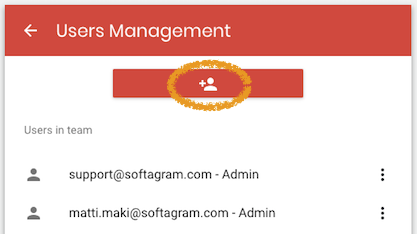
    3. Click the button to add new user

    4. Enter new user name and email
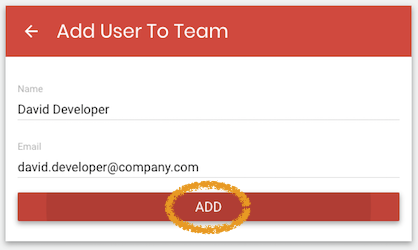
    5. The user will receive an activation email and is able to login right after setting a password.

    Note that our Enterprise edition supports LDAP authentication and group-based access control. In that case there is no need to add users manually.

    Originally published at help.softagram.com

    in Oppaat
    # Softagram Analyzer

    Designed for companies

    We are a team of passionate people whose goal is to improve everyone's life through disruptive products. We build great products to solve your business problems. Our products are designed for small to medium size companies willing to optimize their performance.

    Ota yhteyttä

    Softagram Oy
    Ketolanperäntie 469 
    90450 ​Kempele 

    • +358504836173
    • info@softagram.com
    Follow us
    Copyright © Softagram Oy
    Powered by Odoo - Create a free website