Siirry sisältöön
Softagram
  • Etusivu
  • Palvelut
    • Toiminnanohjaus
    • Tekoälypalvelut
    • Tietoturvapalvelut
  • Yritys
  • Ota yhteyttä
  • Uutiset ja oppaat
    • Uutiset
    • Oppaat
  • Tech
  • Kirjaudu sisään
  • Ota yhteyttä
Softagram
      • Etusivu
      • Palvelut
        • Toiminnanohjaus
        • Tekoälypalvelut
        • Tietoturvapalvelut
      • Yritys
      • Ota yhteyttä
      • Uutiset ja oppaat
        • Uutiset
        • Oppaat
      • Tech
    • Kirjaudu sisään
    • Ota yhteyttä

    How to add team members

    Tutorials
  • Kaikki blogit
  • Oppaat
  • How to add team members
  • 15. elokuuta 2019 kirjoittanut
    How to add team members
    Matti Mäki

    Once you have upgraded to a team license (or when using Softagram Enterprise), you can add an unlimited amount of team members with access to Softagram. Here are the required steps.
    ​
    1. Login to Softagram web, e.g. https://private.softagram.com
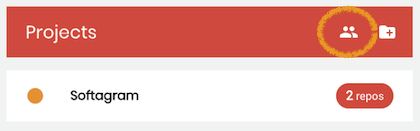
    2. On top of your projects list, click the User Management icon
    ​

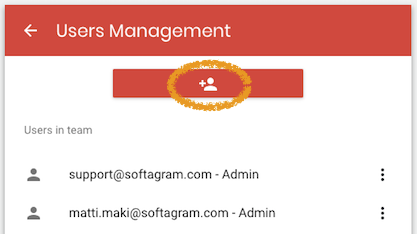
    3. Click the button to add new user

    4. Enter new user name and email
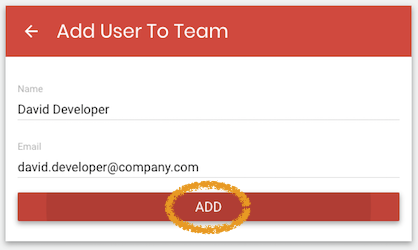
    5. The user will receive an activation email and is able to login right after setting a password.

    Note that our Enterprise edition supports LDAP authentication and group-based access control. In that case there is no need to add users manually.

    Originally published at help.softagram.com

    in Oppaat
    # Softagram Analyzer

    Älyä toiminnanohjaukseen

    Olemme intohimoinen tiimi, jonka tavoitteena on parantaa kaikkien elämää mullistavien tuotteiden avulla. Kehitämme loistavia tuotteita liiketoimintasi ongelmien ratkaisemiseksi. Tuotteemme on suunniteltu pienille ja keskisuurille yrityksille, jotka haluavat optimoida suorituskykynsä.

    Ota yhteyttä

    Softagram Oy
    Ketolanperäntie 469 
    90450 ​Kempele 

    • +358504836173
    • info@softagram.com
    Seuraa meitä
    Copyright © Softagram Oy
    Järjestelmää pyörittää Odoo - Luo ilmainen verkkosivu