
Siirry sisältöön
Softagram
  • Etusivu
  • Palvelut
    • Toiminnanohjaus
    • Tekoälypalvelut
    • Tietoturvapalvelut
  • Yritys
  • Ota yhteyttä
  • Uutiset ja oppaat
    • Uutiset
    • Oppaat
  • Tech
  • Kirjaudu sisään
  • Ota yhteyttä
Softagram
      • Etusivu
      • Palvelut
        • Toiminnanohjaus
        • Tekoälypalvelut
        • Tietoturvapalvelut
      • Yritys
      • Ota yhteyttä
      • Uutiset ja oppaat
        • Uutiset
        • Oppaat
      • Tech
    • Kirjaudu sisään
    • Ota yhteyttä

    How to see the full call paths of a single function with Softagram Desktop

    Tutorials
  • Kaikki blogit
  • Oppaat
  • How to see the full call paths of a single function with Softagram Desktop
  • 15. huhtikuuta 2019 kirjoittanut
    How to see the full call paths of a single function with Softagram Desktop
    Ville Laitila

    I need to change a function named "CalibrationLevel" but first I want to make sure I understand completely it's role in the system, in this case Qt 5.9.

    How to do it in Softagram?

    1. Locate the function: just type "CalibrationLevel" to the search bar. Search is case-insensitive.

    2. Right click the function in question and select Inbound View from dropdown menu.

    3. To see all possible call paths, you want to increase the "Dependency Lookup Level". Below I increased it from 1 to 5.

    4. To see the function level details across the call paths you might need to increase the "Detail Level" too (in my example it is 11). Note that I used "Aggregated Incoming Dependency" KPI to highlight the most critical components along the call paths.
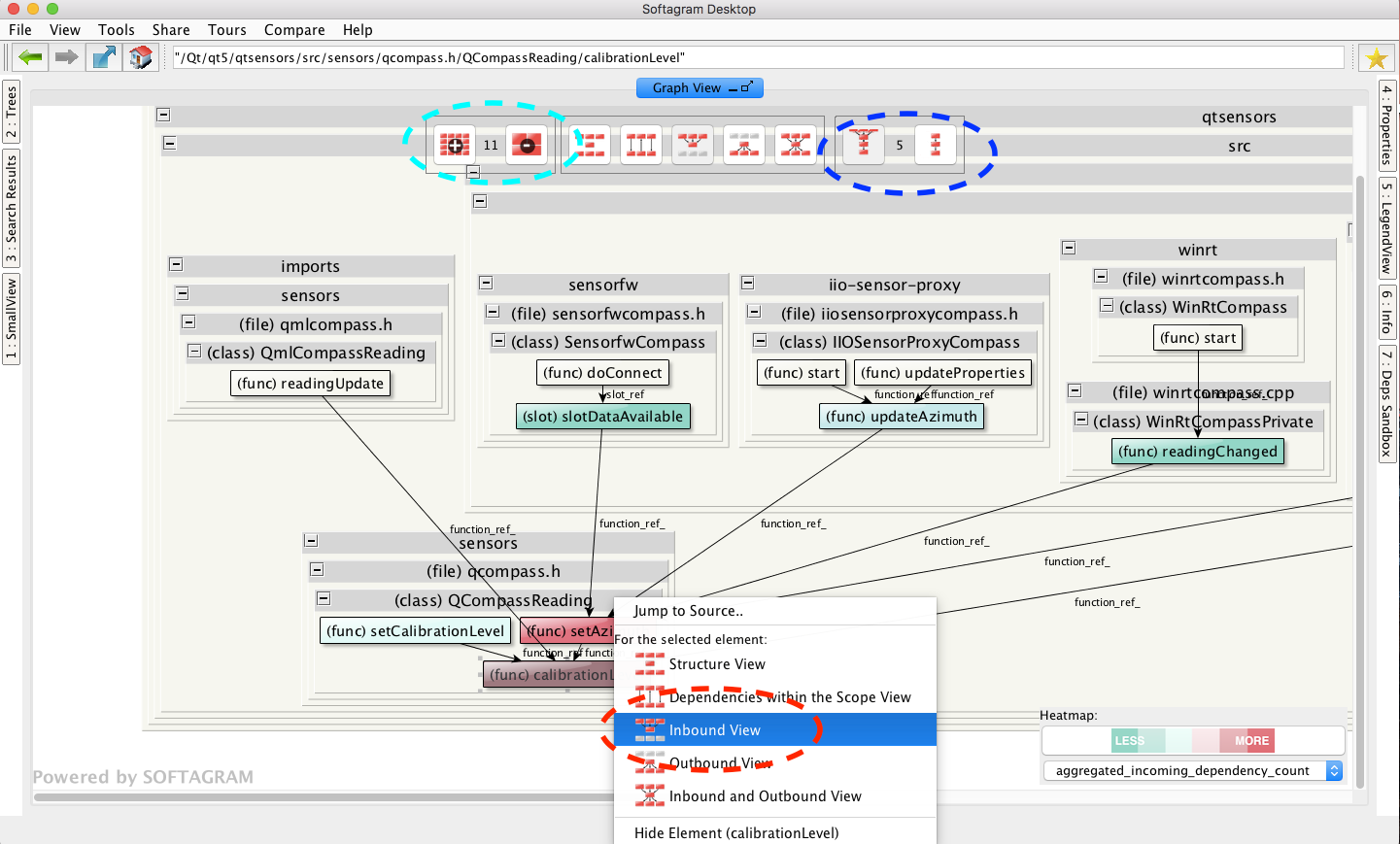
    In 15 seconds you can get full understanding how your change would affect the whole system, and it could easily save an hour of grepping and constructing an idea of the dependencies in your mind, or drawing it to a piece of paper.

    Extra tip:

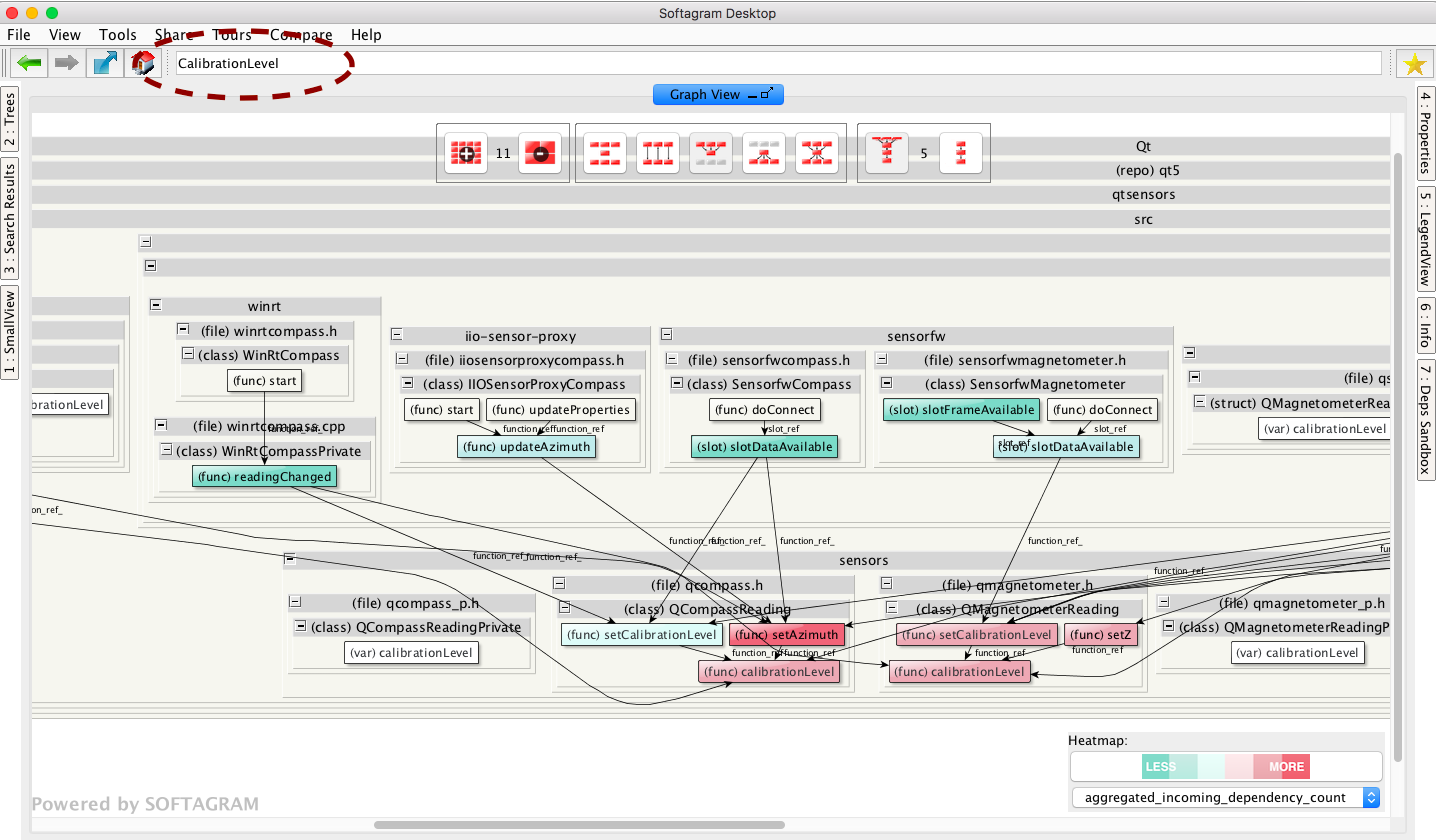
    Now that you have readily proper view settings for call paths, you can check them for any function just by typing the function name to the search bar.

    E.g. in the example above, searching again for "CalibrationLevel" would give me the graph of all functions named "CalibrationLevel" (instead of just the one we looked at above), showing their users and possible refactoring targets:
    Originally published at help.softagram.com

    in Oppaat
    # Softagram Analyzer

    Älyä toiminnanohjaukseen

    Olemme intohimoinen tiimi, jonka tavoitteena on parantaa kaikkien elämää mullistavien tuotteiden avulla. Kehitämme loistavia tuotteita liiketoimintasi ongelmien ratkaisemiseksi. Tuotteemme on suunniteltu pienille ja keskisuurille yrityksille, jotka haluavat optimoida suorituskykynsä.

    Ota yhteyttä

    Softagram Oy
    Ketolanperäntie 469 
    90450 ​Kempele 

    • +358504836173
    • info@softagram.com
    Seuraa meitä
    Copyright © Softagram Oy
    Järjestelmää pyörittää Odoo - Luo ilmainen verkkosivu