
1. Add repositories to Softagram
Login to Softagram
Create a new project or open an existing one
Click the "Add repositories" button on top right corner of the project
Select Bitbucket
Authenticate to Bitbucket if needed - only asked on the first time
Select the repository or repositories that you want to include in a single analysis
Done
2. Enjoy automatic reports
You should now start receiving automatic impact reports to your pull requests.
If you don't receive the reports on your upcoming pull requests, check that the Softagram webhook was created correctly.
Troubleshooting webhook setup in Bitbucket
For each repository to be analyzed, Softagram adds a new webhook in repository settings in Bitbucket. If this didn't work for you, you can add the webhook yourself like this:
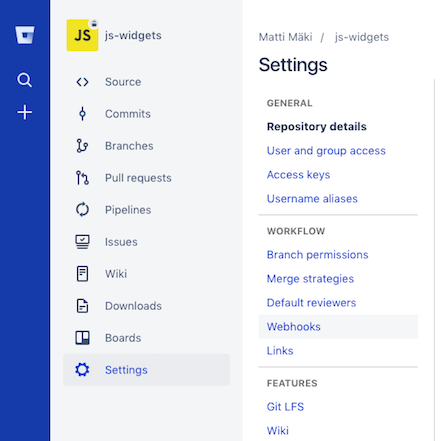
Click "Add webhook" and configure as follows:
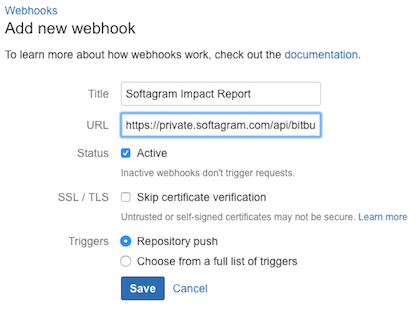
Name: Softagram Impact Report
URL: https://private.softagram.com/api/bitbucket-pullrequest-commenter-webhook
Note: in case you are setting this up in Enterprise deployment, change https://private.softagram.com to whatever is your Softagram installation URL.
Status: Active (checked)
SSL / TLS, skip certificate verification: leave unchecked
Triggers: Select "Choose from a full list of triggers" and check Created and Updated under the Pull request category:
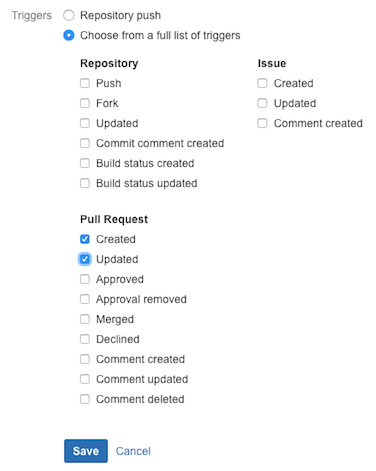
Finally, click Save.
Originally published at help.softagram.com