
Siirry sisältöön
Softagram
  • Etusivu
  • Palvelut
    • Toiminnanohjaus
    • Tekoälypalvelut
    • Tietoturvapalvelut
  • Yritys
  • Ota yhteyttä
  • Uutiset ja oppaat
    • Uutiset
    • Oppaat
  • Tech
  • Kirjaudu sisään
  • Ota yhteyttä
Softagram
      • Etusivu
      • Palvelut
        • Toiminnanohjaus
        • Tekoälypalvelut
        • Tietoturvapalvelut
      • Yritys
      • Ota yhteyttä
      • Uutiset ja oppaat
        • Uutiset
        • Oppaat
      • Tech
    • Kirjaudu sisään
    • Ota yhteyttä

    How to setup impact reports for Bitbucket Cloud

    Integrations
  • Kaikki blogit
  • Oppaat
  • How to setup impact reports for Bitbucket Cloud
  • 15. huhtikuuta 2020 kirjoittanut
    How to setup impact reports for Bitbucket Cloud
    Ville Laitila

    1. Add repositories to Softagram

    • Login to Softagram

    • Create a new project or open an existing one

    • Click the "Add repositories" button on top right corner of the project

    • Select Bitbucket

    • Authenticate to Bitbucket if needed - only asked on the first time

    • Select the repository or repositories that you want to include in a single analysis

    • Done

    2. Enjoy automatic reports

    You should now start receiving automatic impact reports to your pull requests.

    If you don't receive the reports on your upcoming pull requests, check that the Softagram webhook was created correctly.

    Troubleshooting webhook setup in Bitbucket

    For each repository to be analyzed, Softagram adds a new webhook in repository settings in Bitbucket. If this didn't work for you, you can add the webhook yourself like this:
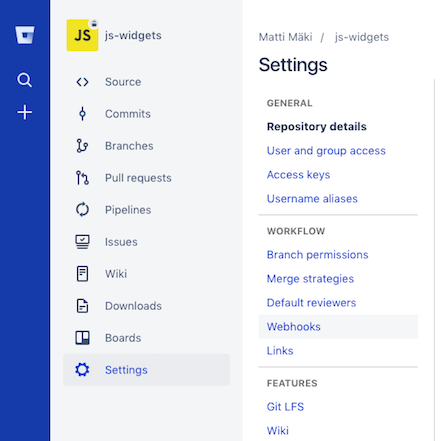
    Click "Add webhook" and configure as follows:
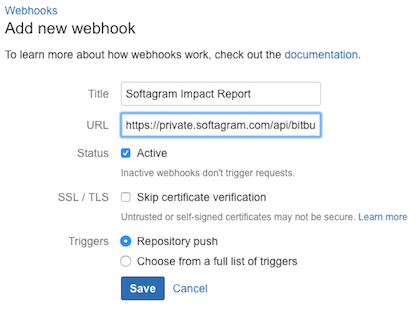
    • Name: Softagram Impact Report

    • URL: https://private.softagram.com/api/bitbucket-pullrequest-commenter-webhook

    • Note: in case you are setting this up in Enterprise deployment, change https://private.softagram.com to whatever is your Softagram installation URL.

    • Status: Active (checked)

    • SSL / TLS, skip certificate verification: leave unchecked

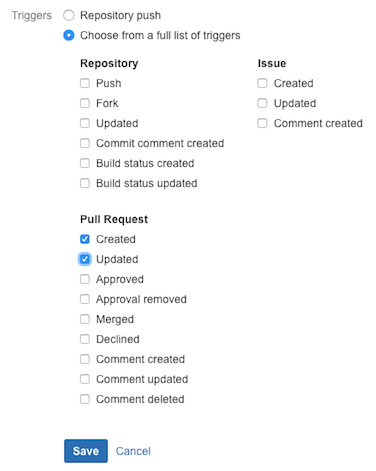
    • Triggers: Select "Choose from a full list of triggers" and check Created and Updated under the Pull request category:

    ​

    Finally, click Save.

    Originally published at help.softagram.com

    in Oppaat
    # Softagram Analyzer

    Älyä toiminnanohjaukseen

    Olemme intohimoinen tiimi, jonka tavoitteena on parantaa kaikkien elämää mullistavien tuotteiden avulla. Kehitämme loistavia tuotteita liiketoimintasi ongelmien ratkaisemiseksi. Tuotteemme on suunniteltu pienille ja keskisuurille yrityksille, jotka haluavat optimoida suorituskykynsä.

    Ota yhteyttä

    Softagram Oy
    Ketolanperäntie 469 
    90450 ​Kempele 

    • +358504836173
    • info@softagram.com
    Seuraa meitä
    Copyright © Softagram Oy
    Järjestelmää pyörittää Odoo - Luo ilmainen verkkosivu