
Note: Bitbucket Server version 5.10+ recommended. Version 5.4 is the minimum supported. Versions prior to 5.4 do not have support for pull request webhooks. If you have older version and want to enable impact reports, please email us at support@softagram.com
1. Configure Bitbucket Server and add repositories to Softagram
If you didn't yet do it, follow this help article to configure access to Bitbucket Server and add your desired repositories to Softagram.
2. Setup webhooks in Bitbucket Server
For each repository to be analyzed, add a new webhook in repository settings in Bitbucket Server:
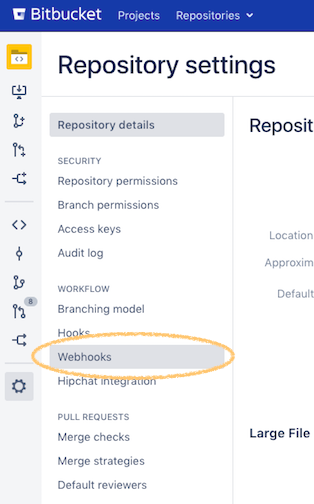
Click "Create webhook"

Configure as follows:
Name: Softagram
URL: https://[softagram.mycompany.com]/api/bitbucket-server-pullrequest-commenter-webhook
Secret: (leave empty)
Click "Test connection". If you get back something else than a green "200", double-check the URL. If you are not able to get it working, click "View details" and send a copy of the details to support@softagram.com
Next, uncheck Repository -> Push and check Pull request -> Opened and Modified (see sample below)
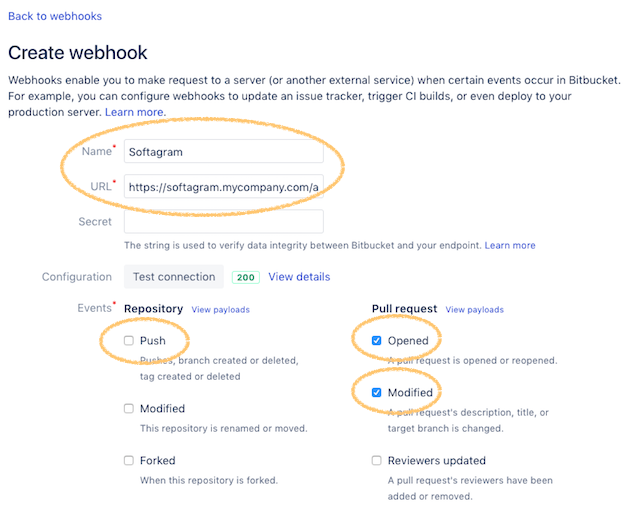
Note that the Modified event might not be available in older Bitbucket Server versions ( < 5.10.x). This means that you won't get updated impact reports when pushing new commits to an existing pull request, until you upgrade your Bitbucket Server version.
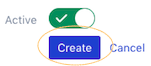
Finally, ensure the webhook is set active and click "Create"
3. You are done!
Given that you have added the repositories to Softagram and successfully configured the webhook, you should receive your first impact report on the next opened or modified pull request.
Originally published at help.softagram.com