
Siirry sisältöön
Softagram
  • Etusivu
  • Palvelut
    • Toiminnanohjaus
    • Tekoälypalvelut
    • Tietoturvapalvelut
  • Yritys
  • Ota yhteyttä
  • Uutiset ja oppaat
    • Uutiset
    • Oppaat
  • Tech
  • Kirjaudu sisään
  • Ota yhteyttä
Softagram
      • Etusivu
      • Palvelut
        • Toiminnanohjaus
        • Tekoälypalvelut
        • Tietoturvapalvelut
      • Yritys
      • Ota yhteyttä
      • Uutiset ja oppaat
        • Uutiset
        • Oppaat
      • Tech
    • Kirjaudu sisään
    • Ota yhteyttä

    Softagram Desktop, Getting started with 3 easy steps

    Quick Guide
  • Kaikki blogit
  • Oppaat
  • Softagram Desktop, Getting started with 3 easy steps
  • 15. tammikuuta 2019 kirjoittanut
    Softagram Desktop, Getting started with 3 easy steps
    Matti Mäki

    1. Get your Softagram credentials

    Login with Github or set a password for your account with the activation email that you received from Softagram.

    If you have any issues with logging in, please ask in the chat below or email us at support@softagram.com.

    2. Download Softagram Desktop

    Click below to start your download, or go to softagram.com/desktop for details.

    Windows
    Mac
    Linux

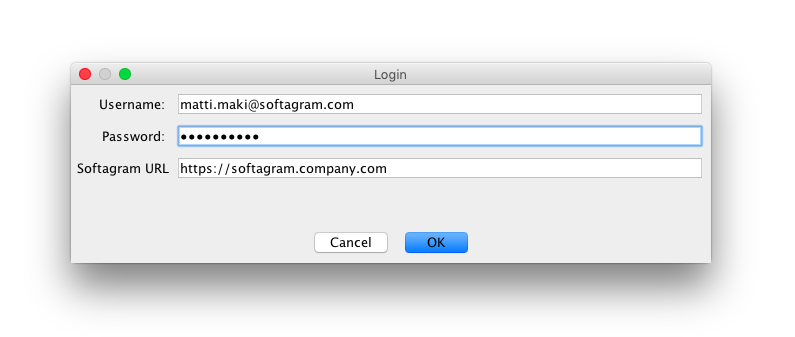
    3. Open Softagram Desktop and login

    Once installed, open Softagram Desktop and login with your credentials. If you use Softagram Enterprise, remember to change the Softagram URL to your company's. Username is your email address.

    NOTE: If you have registered to Softagram Cloud, please use Softagram URL: https://private.softagram.com
    NOTE 2: If you registered to Open Source Cloud, please use  Softagram URL: https://opensource.softagram.com
    4. Enjoy!

    Once you have successfully completed the steps above, read next about Basic Usage.

    Troubleshooting

    Q: What's our Softagram URL?
    A: Check your account activation email - Softagram runs on the same host that was used to set your password.

    Q: What's my username?
    A: It's your email address

    Q: What's my password?
    A: Check your activation email. If you didn't receive one, go to your Softagram URL and click the Forgot password -link, entering your email address. If you can't do any of these, please contact us and we'll sort it out.

    At any point, feel free to contact us in the chat below or by sending email to support@softagram.com. We are happy to help 😊

    Originally published at help.softagram.com

    in Oppaat
    # Softagram Analyzer

    Älyä toiminnanohjaukseen

    Olemme intohimoinen tiimi, jonka tavoitteena on parantaa kaikkien elämää mullistavien tuotteiden avulla. Kehitämme loistavia tuotteita liiketoimintasi ongelmien ratkaisemiseksi. Tuotteemme on suunniteltu pienille ja keskisuurille yrityksille, jotka haluavat optimoida suorituskykynsä.

    Ota yhteyttä

    Softagram Oy
    Ketolanperäntie 469 
    90450 ​Kempele 

    • +358504836173
    • info@softagram.com
    Seuraa meitä
    Copyright © Softagram Oy
    Järjestelmää pyörittää Odoo - Luo ilmainen verkkosivu